
PayBar

Stripe revenue in your Mac menu bar

See net sales, recurring revenue, and available balance at a glance. Switch between Stripe accounts from your Mac.

Launch details for the upcoming 24-hour free trial.

Requires an Apple silicon Mac with macOS 14 or later. Follow the Stripe setup guide to connect your account.

After launch, your trial starts when you connect Stripe. $10 USD to keep PayBar with a one-time purchase.
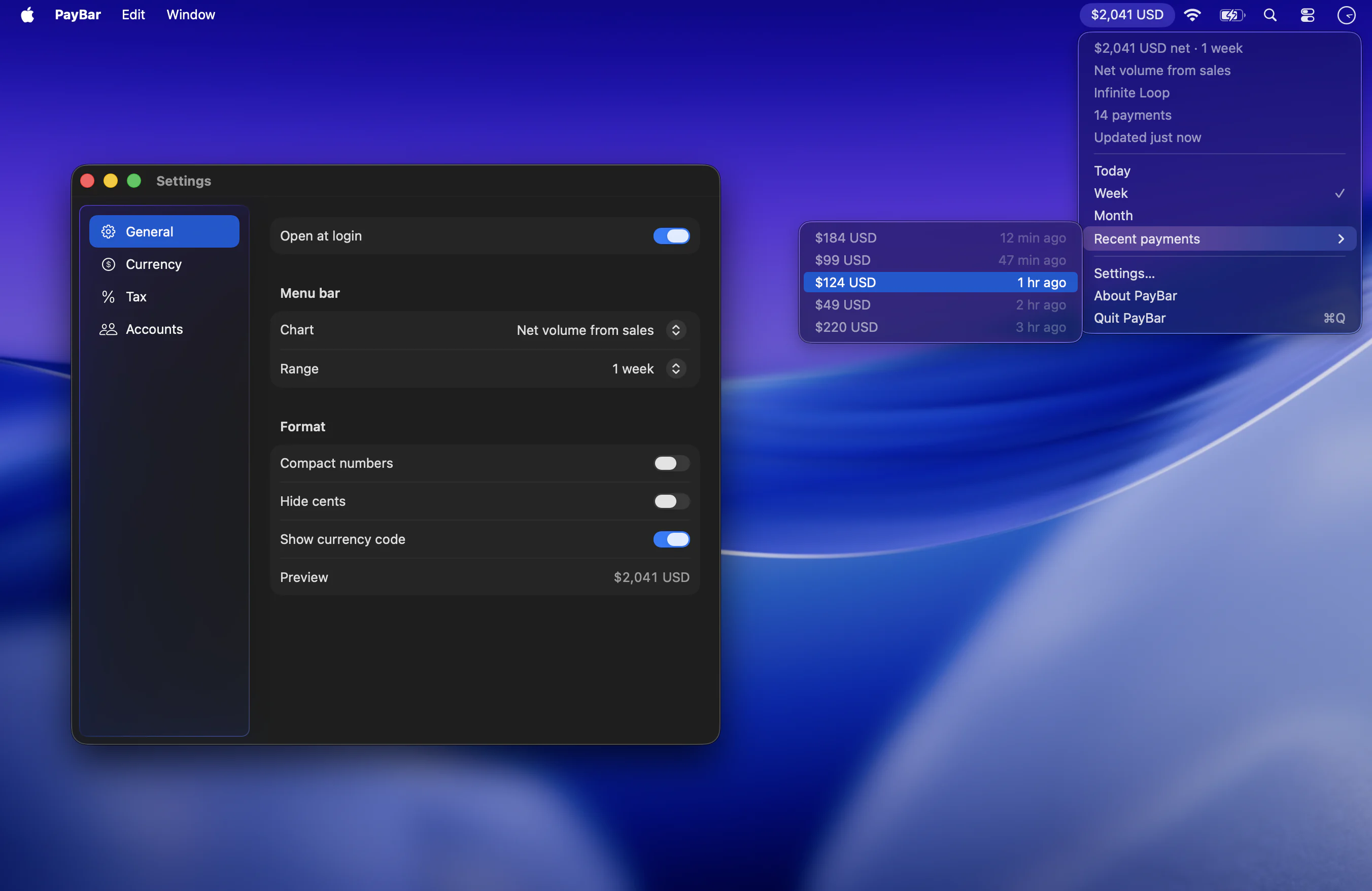
PayBar showing net Stripe sales and recent payments beside the app’s Settings window
PayBar’s menu bar, recent payments and display settings.

Your business at a glance

19 Stripe metrics. Right in your menu bar.

PayBar is a native Stripe revenue tracker for Mac. Choose a metric to pin to your menu bar, from today’s net sales to monthly recurring revenue or available balance, and switch whenever you need.

  • 4Sales & volume
  • 10Billing & subscribers
  • 3Disputes & risk
  • 1Customers
  • 1Balance
Explore all 19 metrics

FEATURE-PACKED

  • Pin today’s net volume or any other metric to your Mac menu bar.
  • Switch between charts for gross volume, successful payments, and spend per customer.
  • Track MRR, ARR, churn, trials, and subscriber lifetime value.
  • See dispute activity, dispute counts, and high-risk payments.
  • Check your available balance from the menu bar.
  • Switch between Today, Week, and Month from the menu.
  • Choose 4 weeks, quarter to date, year, or all time in Settings.
  • Use current exchange rates to show amounts in your chosen currency.
  • Set a tax rate to see after-tax figures.
  • Use compact numbers, hide cents, and choose whether to show currency codes.
  • Connect with a restricted Stripe key with read access to the Stripe data you want to see.
  • Your key stays in Keychain. Your settings stay on this Mac.
  • View Stripe accounts on their own or combine their totals.
  • Start PayBar at login and keep it in the menu bar. It has no Dock icon.
  • Built in Swift for Apple silicon Macs running macOS 14 or later.
  • See how much each recent payment was and when it came in.
  • Open General, Currency, Tax, and Accounts in Settings.
  • Preview the menu bar display as you change the format.
  • Keep an eye on high-risk payments that could lead to disputes.
  • Track new customers, subscribers, and trials.
  • See subscriber churn and trial conversion rates.
  • See revenue per subscriber and revenue lost to churn.
  • Show the currency code so you know which dollar you’re seeing.
  • Hide cents to round amounts to whole units.
  • Shorten large totals with formats like $2.0K.
  • PayBar refreshes in the background and shows when it last updated.
  • PayBar is a native Mac app that runs in the menu bar.
  • Browse charts by group (Volume, Risk, Customers, Billing, Balance).
  • See net volume, date range, account, and payment count in the menu.
  • Open a recent payment directly in the Stripe Dashboard.
  • Set net volume from sales as your default menu bar metric.
  • Switch Stripe accounts from the menu bar.
  • Preview your format, like $2,041 USD, before you pin a metric.
  • Set your own tax rate or start at 32%.
  • Made for founders who check Stripe throughout the day.
  • A small Mac app that tracks a wide range of Stripe metrics.
  • When checkout opens, try every feature free for 24 hours. After launch, your trial starts when you connect Stripe.
  • At launch, keep PayBar with a one-time purchase of $10 USD through Stripe Checkout. Your license key appears after checkout.
  • See privacy and licensing or contact Jasper Studios.

Pricing

Try free for 24 hours. Keep PayBar for $10 USD.

The trial will include every feature and start when you connect Stripe. Buy PayBar once to keep using it. Online checkout opens shortly. Downloads and trials will be available at launch.

One-time purchase

$10 USD

  • Keep PayBar after your trial ends
  • Buy during or after the trial
  • Activate with your license key in Settings
  • Secure checkout through Stripe

Good to know

Frequently asked questions

Is PayBar an official Stripe app?

No. PayBar is an independent Stripe menu bar app for Mac by Jasper Studios. It puts selected revenue, payment and billing metrics in your menu bar without replacing the Stripe Dashboard. Read about Stripe apps for Mac.

Which Macs does PayBar support?

PayBar requires an Apple silicon Mac with macOS 14 or later, a Stripe account and an internet connection.

Can PayBar move money or change my payments?

No. Connect with a restricted Stripe API key with read-only permissions. PayBar stores the key in your Mac’s Keychain and retrieves your metrics directly from Stripe. See how to connect Stripe securely.

Can I track more than one Stripe account?

Yes. Add each account, switch between them from the menu bar, or combine totals for supported metrics. Learn about multiple accounts.

How does the free trial work?

Try all features free for 24 hours, starting when you connect Stripe. At launch, a $10 USD license will keep PayBar running after your trial. No subscription.

Are the revenue and tax numbers exact?

PayBar refreshes the selected metric automatically. Metrics such as currency conversion and after-tax revenue are estimates; they may differ from settlement totals and your actual tax obligations. Calculate an example.

Ready to keep Stripe on your menu bar?

Online checkout opens shortly.